Watercolor Alphabet - Procreate: A Creative Guide
In the digital art world, the quest for textures that mimic traditional media has always been a priority for creators. The Watercolor Alphabet - Procreate brush set bridges the gap between the fluidity of wet-on-wet painting and the precision of digital design. This tool is not merely a collection of letters; it is a versatile asset designed to elevate graphics, Instagram posts, digital planning layouts, and scrapbooking projects. By understanding how to leverage this resource, artists and business owners can add a unique, handcrafted touch to their work without the mess or drying time associated with physical paints.
The Essence of Digital Watercalligraphy
Digital watercolor brushes have revolutionized how we approach typography in graphic design. Unlike standard vector fonts which can appear rigid and sterile, the Watercolor Alphabet - Procreate offers organic edges, subtle color variations, and the natural imperfections found in real paper and pigment. When you tap a stamp from this set, you are not just placing a letter; you are applying a texture that breathes life into your composition.
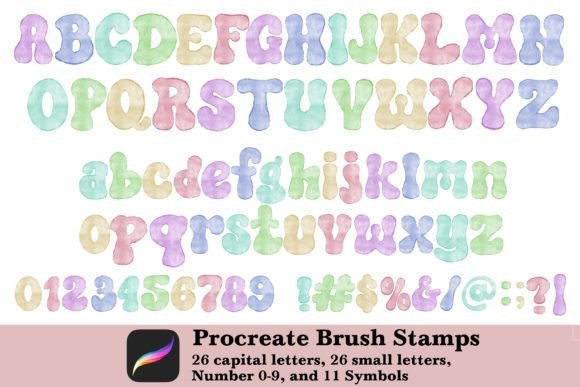
This specific set is comprehensive, providing everything needed for a full typographic project within a single zipped file. It includes:
- 26 Capital Letters: Perfect for headlines, logos, and bold statements.
- 26 Small Letters: Ideal for body text, captions, and detailed notes.
- Numbers 0-9: Essential for dates, pricing, and lists.
- 11 Symbols: Including punctuation and decorative elements to complete your sentences.
Each character functions as a brush stamp, allowing for instant application while retaining the aesthetic of a painted stroke. This combination of speed and artistic quality makes it an invaluable tool for professionals who need to produce high-quality content quickly.
Practical Applications for Creators and Business Owners
The versatility of the Watercolor Alphabet - Procreate extends far beyond simple lettering exercises. Its primary strength lies in its adaptability across various digital mediums. For social media managers and influencers, creating engaging Instagram posts often requires visuals that stand out in a crowded feed. Using these watercolor stamps allows for the creation of custom quotes, event announcements, and product highlights that feel personal and artisanal.
For those involved in digital planning, the ability to customize headers and daily logs is crucial. Standard fonts can sometimes clash with the soft, pastel backgrounds common in digital planners. The watercolor effect blends seamlessly, creating a cohesive look that enhances readability while adding visual interest. Similarly, digital scrapbookers benefit immensely from this set. Instead of searching for physical stickers or printing them out, users can simply import the brush set and "stamp" memories directly onto their digital pages.
Small business owners also find significant value here. Whether designing a logo for a new boutique, creating packaging labels for handmade goods, or drafting invitations for a launch party, the organic nature of these letters conveys a sense of warmth and authenticity that corporate sans-serif fonts often lack. It suggests a human touch, which is a powerful marketing asset in today's digital economy.
How to Install and Import Your Brushes
Getting started with the Watercolor Alphabet - Procreate is straightforward, but following the correct steps ensures a smooth workflow. The process relies on the iPad's file management system and Procreate's built-in import features. Here is a step-by-step guide to setting up your workspace:
- Prepare Your Device: Ensure your iPad is charged and connected to a stable internet source if you downloaded the file externally.
- Unzip the File: Locate the downloaded zipped file in your Files app. Tap on it to unzip the contents. This action reveals the actual brush set file (usually with a .brushset extension).
- Import into Procreate: Open the Procreate application on your iPad. Navigate to the Brush Library, typically found by tapping the brush icon in the top toolbar. Look for the "+" symbol or the share/import option depending on your version.
- Select and Install: Choose the unzipped brush set file from your recent downloads. Procreate will automatically import the entire collection, including all capital letters, small letters, numbers, and symbols, into your brush library.
Once imported, the Watercolor Alphabet - Procreate set will appear as a distinct category within your brush list, ready for immediate use. There is no complex configuration required; the brushes are pre-set to function as stamps upon installation.
Mastering the Stamp Technique
Understanding how to manipulate these brushes is key to unlocking their full potential. Since each character is a stamp, the basic interaction is simple: choose a stamp and tap on the canvas. However, true creativity comes from customization. Unlike static images, these brush stamps respond to Procreate's dynamic settings.
You can resize these stamp brushes instantly by using the two-finger pinch gesture on the screen before or after tapping. This allows for dramatic scale changes, making a tiny lowercase 'a' a massive focal point or shrinking a capital 'Z' to fit into a tight margin. Furthermore, you have full control over the opacity. Lowering the opacity creates a faded, ghosted effect perfect for background textures, while increasing it yields bold, vibrant strokes.
Color customization is another vital feature. You can change the color of the brush to match any palette, from soft pastels to deep, saturated hues. Advanced users can also adjust the flow, spacing, and grain settings within the brush studio to alter how the watercolor pigment interacts with the virtual paper texture. This flexibility means that one brush set can generate hundreds of unique variations, ensuring your designs never look repetitive.
Evaluating Suitability for Your Projects
While the Watercolor Alphabet - Procreate is incredibly useful, it is important to consider its limitations and best-use scenarios. Because these are stamp-based brushes, they are not ideal for continuous cursive writing where letters must connect fluidly. They excel in block lettering, scattered typography, and individual character placement. If your project requires long paragraphs of flowing script, a dedicated calligraphy brush might be more appropriate.
Additionally, since this is a digital asset, the final output depends on the resolution of your canvas. Always ensure your Procreate document is set to a high enough DPI (dots per inch) if you plan to print your designs. While the watercolor effect looks stunning on screens, printing requires sufficient pixel density to maintain clarity. For purely digital applications like social media or web graphics, standard resolutions usually suffice.
It is also worth noting the licensing terms. This set is intended for personal and commercial use by the purchaser, but it strictly prohibits sharing or reselling the brush files themselves. This protects the intellectual property of the creator and ensures the quality remains exclusive to those who support the artist directly.
Conclusion: Elevating Your Digital Artistry
The Watercolor Alphabet - Procreate represents a significant leap forward for digital artists seeking to incorporate traditional aesthetics into modern workflows. By combining the ease of digital tools with the charm of watercolor painting, it empowers creators to produce professional-grade graphics with minimal effort. Whether you are a seasoned designer looking to expand your toolkit or a hobbyist eager to start your first digital scrapbook, this brush set offers a robust foundation for creative expression.
Remember, the value of this tool lies not just in the letters provided, but in the freedom it gives you to experiment with size, color, and opacity. As you explore the possibilities, you will discover that the line between digital efficiency and artistic soul is thinner than ever. With the right techniques and a little imagination, the Watercolor Alphabet - Procreate can transform simple text into captivating visual stories.