Unlocking Creativity with the Samoyed Brush Stamp
In the vibrant world of digital illustration, the tools you choose often define the speed and quality of your workflow. For artists specializing in pet portraits, character design, or whimsical stationery, finding the right asset can be the difference between a tedious hour of tracing and a few seconds of inspired stamping. Enter the Samoyed Brush Stamp, a specialized digital tool designed for the Procreate app on iPad. This collection offers a unique solution for creators who need to incorporate the iconic, fluffy features of the Samoyed breed—or similar spitz-type dogs—into their artwork without starting from scratch.
The Essence of Digital Stamp Brushes
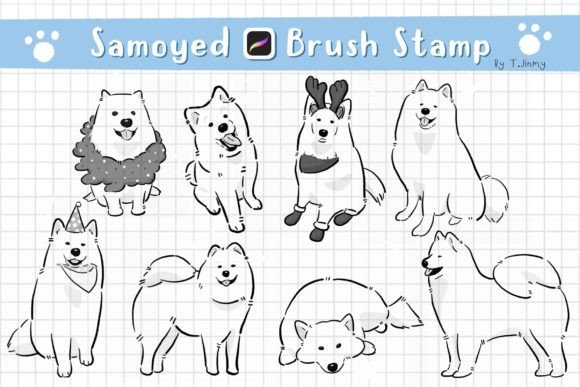
Before diving into the specifics of this particular set, it is important to understand what a brush stamp actually does within a creative environment. Unlike traditional brushes that require you to draw every curve and contour manually, a stamp brush functions as a pre-drawn image embedded directly into your tool palette. When you tap the screen with your stylus, the entire image appears instantly. The Procreate Samoyed Brush Stamps take this concept further by offering eight individual variations. These are not merely static images; they are dynamic elements that respond to the pressure and movement of your Apple Pencil.
This specific collection was hand-drawn in Procreate, ensuring that the line art retains the organic feel of a sketch rather than the sterile look of a vector clip-art. The result is a set of assets that blend seamlessly with other hand-drawn elements in your project. Whether you are creating a birthday card, a social media graphic, or a complex illustration, these stamps provide a foundation that saves time while maintaining artistic integrity.
Key Features and Customization Options
The true power of the Samoyed Brush Stamp lies in its versatility. While the core asset is a pre-drawn line art of a Siberian Husky or Samoyed, the tool allows for significant manipulation once imported. Here is how you can adapt these brushes to fit any design aesthetic:
- Mix and Match Designs: With eight distinct stamps available, you are not limited to a single pose. You can layer different angles, expressions, and body parts to create entirely new compositions. One artist might use a head shot for a logo, while another combines a full-body stamp with a tail stamp to create a custom scene.
- Scaling and Resizing: One of the most common challenges with digital assets is fitting them into a specific layout. These brushes allow you to scale them up or down without losing resolution. A tiny icon for a website header can be created from the same brush used for a large poster print.
- Color and Opacity Control: Although the base file contains line art, the color is not fixed. You can change the stroke color to match your brand guidelines or the mood of your illustration. Furthermore, adjusting the opacity allows you to create subtle watermarks, background textures, or ghostly effects, adding depth to your work.
- Pressure Sensitivity: Because these are native Procreate brushes, they utilize the pressure sensitivity of your Apple Pencil or compatible stylus. This means you can vary the thickness of the lines or the intensity of the stamp based on how hard you press, giving you a level of control that standard image files do not offer.
Who Benefits from These Tools?
The utility of the Procreate Samoyed Brush Stamps extends beyond hobbyists. A wide range of professionals can integrate these assets into their daily workflows to enhance productivity.
Independent Artists and Illustrators often face tight deadlines when commissioning pet portraits. Using a high-quality stamp allows them to block out the main subject quickly, focusing their energy on adding unique details, shading, and background elements. It accelerates the initial phase of the creative process significantly.
Small Business Owners who sell digital products, such as printable planners, stickers, or greeting cards, find immense value in these resources. Instead of spending hours drawing a dog for a seasonal sale, they can use the Samoyed Brush Stamp to generate consistent, professional-looking graphics in minutes. This efficiency translates directly to a larger product catalog and more frequent releases.
Social Media Managers and Content Creators also benefit. In an era where visual content must be produced rapidly, having a library of ready-to-use, customizable stamps ensures that posts remain fresh and engaging without requiring advanced drawing skills. A simple tap can add a playful element to a story or post, making the content more relatable to audiences who love dogs.
Technical Requirements and Compatibility
While the flexibility of these brushes is impressive, it is crucial to understand the technical ecosystem required to use them. The Samoyed Brush Stamp is built specifically for the Procreate application on the iPad. This is a critical distinction for potential users.
To utilize these brushes effectively, you must have:
- An iPad capable of running the Procreate app.
- An Apple Pencil or a compatible, pressure-sensitive stylus. Without pressure sensitivity, the nuanced control over line weight and opacity is lost.
- The Procreate App installed on your device.
Important Note: These brushes DO NOT work in Photoshop, Clip Studio Paint, or any other desktop or mobile application outside of the Procreate ecosystem. They are proprietary brush sets (.brushset files) designed exclusively for Apple's software. Attempting to import them into non-compatible programs will result in errors or missing data. If you are a Windows user or rely solely on desktop software, these specific assets will not serve your needs.
Installation: A Step-by-Step Guide
Getting started with your new digital tools is straightforward, but it requires following a specific sequence to ensure the files import correctly. Many users encounter issues simply because they try to open the ZIP file directly in the wrong application. Follow this guide to successfully install the 8 Procreate Siberian Husky line art Brush Stamps:
- Download and Unzip: Begin by downloading the file to your iPad. Before attempting to open anything in Procreate, you must unzip the file. Locate the downloaded ZIP file in your Files app, tap it, and wait for it to extract the contents. You should now see a folder containing the brush set.
- Locate the File: Open the "Files" app on your iPad and navigate to the folder where you saved the download. Find the extracted brush file (usually ending in .brushset).
- Initiate Sharing: Tap and hold the file with your finger or Apple Pencil until a context menu appears. Select "Share" from the options.
- Select Procreate: Look for the option "Open in Procreate." If you do not see it immediately, tap "More" at the bottom of the share sheet. Scroll through the list of apps, find "Procreate," toggle it on, and click "Done."
- Import and Verify: Once selected, the file will automatically transfer. Open your Procreate app and start a new project. Tap the Brush icon (the paintbrush symbol) at the top right corner.
- Find Your Set: In the brush library, scroll to the bottom or check the "Imported" section. You should see a new folder named after the brush set. Tap it to reveal the eight individual Samoyed stamps.
If the brushes do not appear, double-check that you unzipped the file first. Importing a ZIP file directly usually fails because Procreate cannot read the compressed format as a brush set.
Practical Applications and Creative Scenarios
Once installed, the possibilities for the Samoyed Brush Stamp are vast. Consider a scenario where a designer is creating a "Winter Wonderland" themed invitation suite. Instead of drawing a snow-loving dog from scratch, they select a stamp showing a happy, fluffy Samoyed. They resize it to fit the corner of the invitation, change the line color to a soft blue to match the icy theme, and lower the opacity slightly so it doesn't overpower the text. Within moments, the invitation has a cohesive, professional look.
Another example involves a children's book illustrator. They need a recurring character—a loyal dog companion. By using one of the eight stamps as a base, they can maintain consistency in the character's proportions across different pages. They can then trace over the stamp to add unique expressions or clothing, knowing the underlying anatomy is already correct.
Evaluating Suitability for Your Projects
While these brushes are powerful, they are not a magic wand for every situation. They are best suited for projects that embrace a hand-drawn, illustrative style. If your project requires photorealism, these line art stamps will likely clash with the aesthetic. Additionally, if you need a dog breed other than a Samoyed or Husky, these specific stamps may not fit unless you plan to heavily modify them.
Ultimately, the Procreate Samoyed Brush Stamps represent a bridge between speed and creativity. They remove the drudgery of repetitive drawing tasks, allowing artists to focus on composition, storytelling, and color theory. For anyone with an iPad and a passion for digital art, this toolset offers a practical, efficient way to bring the joy of these beloved dogs into their creative work. By understanding how to install, customize, and apply these brushes, you unlock a new level of productivity in your digital studio.