Puppy Brush Stamp: A Practical Guide for Procreate Artists
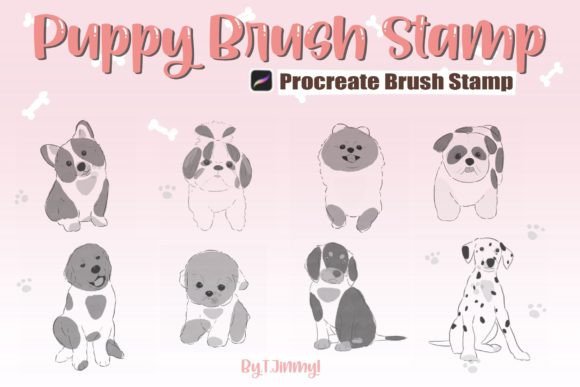
Digital illustration often hinges on the balance between efficiency and artistic expression. For artists working within the Apple ecosystem, the Puppy Brush Stamp offers a specific solution to streamline character design while maintaining a hand-drawn aesthetic. This resource is not merely a collection of images but a set of eight distinct, pressure-sensitive stamp brushes designed exclusively for the Procreate application. Understanding the mechanics, limitations, and comparative advantages of these tools is essential for anyone evaluating their digital toolkit.
The core appeal of the Puppy Brush Stamp lies in its versatility. Unlike static image assets that require manual placement and scaling, these stamps function as dynamic brushes. Users can mix and match designs, resize them instantly, adjust opacity, and alter colors directly within the brush settings. This flexibility allows for rapid iteration in concept art, pattern creation, or detailed illustrations without sacrificing the organic feel of hand-drawn elements. However, the utility of this tool is strictly bound by the hardware and software environment required to run it.
Understanding the Technical Requirements and Limitations
Before integrating the Puppy Brush Stamp into a workflow, it is critical to assess the technical prerequisites. These brushes are native to the Procreate app and rely heavily on the iPad's touch interface and pressure sensitivity. To utilize them effectively, you must have an iPad, an Apple Pencil (or a compatible pressure-sensitive stylus), and the Procreate application installed. The pressure sensitivity is what transforms a simple stamp into a drawing tool, allowing for varied line weights and natural-looking strokes.
A significant limitation for potential users is compatibility. The Puppy Brush Stamp does not work in Adobe Photoshop, Clip Studio Paint, or any other third-party application. While many digital artists prefer cross-platform workflows, this asset is proprietary to the Procreate ecosystem. If your primary workspace is a desktop computer or a non-Apple tablet, this resource will not be functional. This distinction is vital when comparing options; while vector-based or raster-compatible formats might offer broader portability, they often lack the immediate, gesture-based integration found in Procreate-specific brush sets.
The delivery format also influences the user experience. You receive a single ZIP file containing the eight Procreate Puppy Brush Stamps. Proper installation requires unzipping the file before importing. If the automatic import fails—a common occurrence depending on how files are saved—users must manually transfer the brushes via the Files app. This process involves tapping and holding the file, selecting "Share," and choosing "Open in Procreate." If this option is not immediately visible, accessing the "More" menu to locate the Procreate icon is necessary. Once imported, the new brush set appears in the library alongside existing palettes, ready for immediate use.
Comparing Puppy Brush Stamps with Alternative Assets
When evaluating digital resources, it is helpful to compare the Puppy Brush Stamp against other common asset types, such as PNG cutouts, vector shapes, and standard texture brushes. Each category serves a different purpose and suits different stages of the creative process.
Static PNGs vs. Dynamic Stamps
Traditional PNG assets are pre-rendered images. While they offer high resolution, they lack the adaptability of the Puppy Brush Stamp. With a PNG, changing the color requires layer blending modes or masking, and resizing can lead to pixelation if not handled carefully. In contrast, the Puppy Brush Stamp allows for real-time color changes and scaling without quality loss, provided the resolution remains within the canvas limits. This makes the stamp superior for projects requiring multiple variations of the same motif, such as creating a repeating pattern or populating a scene with various puppies.
Vector Shapes vs. Hand-Drawn Textures
Vector graphics are infinitely scalable and editable, making them ideal for logos and print media. However, vectors often possess a clean, geometric look that can feel sterile compared to the organic imperfections of hand-drawn art. The Puppy Brush Stamp captures the nuance of a hand-drawn sketch, complete with slight irregularities that add character. For illustrators seeking a whimsical, storybook, or scrapbook style, the texture inherent in these stamps provides a warmth that vectors cannot replicate without extensive texturing efforts.
Standard Texture Brushes vs. Character Stamps
General texture brushes are excellent for backgrounds or surface details but are not designed for character placement. The Puppy Brush Stamp bridges the gap between a texture and a character asset. It allows the artist to treat a complex subject like a puppy as easily as applying a speckle or grain effect. This efficiency is particularly valuable in brainstorming sessions where speed is more important than perfect detail.
Evaluating Strengths and Tradeoffs
The decision to adopt the Puppy Brush Stamp involves weighing several strengths against specific tradeoffs. The primary strength is speed. Being able to place, rotate, scale, and recolor a character element with a single stroke accelerates the ideation phase significantly. This is especially useful for adult learners and professionals who need to produce mockups or concepts quickly.
However, the tradeoff is a degree of uniformity. Because there are only eight individual stamps, overusing them can result in a repetitive look if the artist does not vary the size, rotation, and color sufficiently. Additionally, since these are raster-based stamps, extreme zooming or printing at very large scales may reveal pixelation, unlike vector alternatives. Artists must consider the final output medium; for web graphics, social media content, or small-format prints, the resolution is typically sufficient. For large-scale billboards or high-end editorial spreads, supplementary high-resolution detailing might be required.
Another consideration is the learning curve associated with setup. While the import process is straightforward, ensuring the brushes load correctly and understanding how to manipulate their settings (such as opacity and flow) takes time. Users unfamiliar with Procreate's brush engine may initially struggle to achieve the desired results. Nevertheless, once mastered, the ability to customize the brush behavior offers a level of control that static assets simply cannot match.
Best-Fit Situations and Decision Factors
The Puppy Brush Stamp is the right choice for specific scenarios. It excels in projects that require a playful, hand-crafted aesthetic, such as children's book illustrations, greeting card designs, and digital scrapbooking. It is also highly effective for creating seamless patterns, where the ability to mix and match the eight different stamps creates visual interest without the monotony of a single repeated image.
For artists focusing on rapid prototyping, these brushes allow for quick exploration of composition and character placement. Instead of drawing a puppy from scratch for every variation, an artist can stamp, move, and adjust the asset to find the perfect pose or grouping. This approach saves hours of labor during the early stages of a project.
Conversely, readers should look for alternative options if their workflow relies heavily on desktop software like Photoshop or Illustrator. In those environments, investing in vector packs or high-resolution PSD layers would be more practical. Similarly, if a project demands photorealism or highly detailed anatomical accuracy, a stamp brush may be too stylized and simplified. In such cases, traditional drawing techniques or 3D modeling tools might yield better results.
Ultimately, the value of the Puppy Brush Stamp depends on alignment with the artist's tools and goals. For the Procreate user seeking to enhance their efficiency while maintaining a charming, hand-drawn style, this resource offers a compelling balance of flexibility and ease of use. By understanding its technical boundaries and comparing it thoughtfully with other asset types, artists can make informed decisions that optimize their creative process.