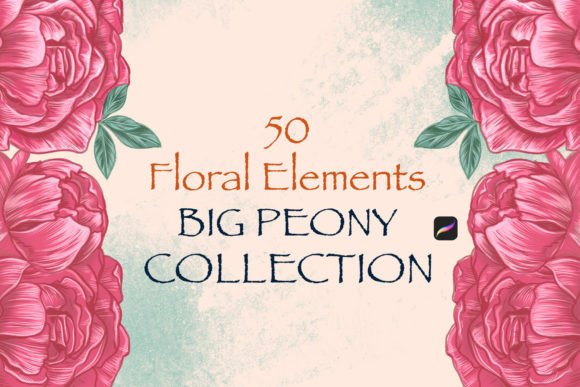
Floral Elements . Big Peony Collection: Elevating Digital Art with Depth and Texture
For digital artists, illustrators, and designers working on the iPad, finding a resource that bridges the gap between realistic botanical detail and seamless workflow integration is often the missing link in a creative project. The Floral Elements . Big Peony Collection addresses this need directly by offering a curated suite of high-fidelity textures and shapes designed specifically for the Procreate environment. Unlike generic clip art or flat vector assets, this collection focuses on the organic complexity of peonies—their layered petals, soft gradients, and natural irregularities—allowing creators to build compositions that feel hand-painted rather than digitally assembled.
The true value of the Floral Elements . Big Peony Collection lies not just in the visual quality of the flowers themselves, but in how they function as modular building blocks within a larger design system. Whether you are sketching a wedding invitation, designing a fashion textile pattern, or creating a whimsical social media graphic, these elements provide a consistent aesthetic foundation. They eliminate the hours typically spent painting individual petal layers from scratch, freeing up time for composition, color theory, and conceptual development.
Real-World Applications Across Industries
The versatility of the Big Peony Collection makes it a powerful tool across several distinct professional landscapes. In the realm of wedding and event planning, the demand for custom stationery has never been higher. Designers can utilize these brush sets to create unique save-the-date cards, menu headers, and seating charts. Because the brushes mimic real paint strokes, the resulting designs possess a tactile warmth that resonates with clients seeking an elegant, romantic vibe. A planner might use the collection to mock up a floral arch arrangement for a client presentation, instantly visualizing how different shades of pink and cream peonies would look against a specific backdrop without needing to source physical flowers or hire a photographer.
In the fashion and textile industry, the application shifts toward pattern repetition and surface design. Textile designers often struggle to create patterns that look natural when tiled. The Floral Elements . Big Peony Collection offers varied angles and bloom stages, allowing artists to scatter elements organically across a canvas. This is particularly useful for creating prints for summer dresses, scarves, or home decor linens. By adjusting the opacity and blending modes of the brush strokes, a designer can achieve depth, making some blooms appear foreground while others recede into the background fabric texture.
For social media managers and content creators, the collection serves as a rapid prototyping tool. Consistency in branding is key, and having a dedicated set of floral assets ensures that every Instagram story, Pinterest pin, or blog header maintains a cohesive visual identity. Instead of searching stock photo sites for images that match a specific color palette, creators can generate custom graphics on the fly. For instance, a beauty influencer launching a new skincare line could use the big peony brushes to frame product shots, adding a touch of luxury and nature-inspired elegance that aligns with their brand story.
How Different Users Benefit from the Collection
The utility of the Floral Elements . Big Peony Collection scales beautifully depending on the user's skill level and goals. Professional illustrators appreciate the ability to customize the brush settings, tweaking size jitter, shape dynamics, and wetness to suit their personal style. They can layer these brushes over watercolor backgrounds or combine them with other textures to create mixed-media effects that stand out in a crowded market.
Conversely, hobbyists and aspiring artists benefit from the "shortcut" aspect of the collection. Learning to paint realistic flowers requires years of practice in understanding light, shadow, and form. With these stencil brushes, beginners can achieve professional-looking results immediately. This immediate gratification encourages continued practice and experimentation. A user might start by simply stamping the flowers onto a page, then gradually learn to manipulate the brush pressure and tilt to add their own artistic flair, effectively using the collection as both a final asset and a learning tool.
Business owners who are not necessarily artists also find immense value here. Many small business owners handle their own marketing materials. Having access to a high-quality brush set allows them to create bespoke logos, packaging labels, or promotional flyers without outsourcing the design work. It democratizes high-end design, enabling entrepreneurs to maintain a premium aesthetic while keeping overhead costs low.
Technical Integration and Workflow Efficiency
One of the most significant advantages of the Floral Elements . Big Peony Collection is its seamless integration into the Procreate ecosystem. The collection comes packaged in the modern .brushset format, which streamlines the installation process significantly compared to older methods where users had to import individual brushes one by one. This format ensures that all related tools—variations of the peony, leaves, and stems—are installed simultaneously, ready for immediate use.
To get started, users need an iPad running Procreate version 4.1 or higher. The transfer process is designed to be intuitive. If you have a Mac running macOS 10.11 or higher, AirDrop offers the quickest route. You can simply select the .brushset file on your computer, choose AirDrop, and send it directly to your iPad. Once received, tapping the file opens a prompt to copy it directly to Procreate. Within seconds, the new set appears at the top of your brush library, organized and accessible.
For those without a Mac, the Dropbox method remains a reliable alternative. By transferring the final .brushset file to a specific subfolder in your Dropbox account, you can access it via the Dropbox app on your iPad. Navigating to the file, clicking the three-dot icon, selecting "Export," and choosing "Copy to Procreate" completes the setup. This flexibility ensures that regardless of your hardware setup, the barrier to entry is minimal, allowing you to focus on creation rather than technical troubleshooting.
Considerations Before You Start Creating
While the Floral Elements . Big Peony Collection is incredibly robust, there are practical considerations to keep in mind to maximize its potential. First, understand that these are stencil-based brushes. While they offer great texture, they rely heavily on the artist's hand movement for variation. Simply stamping the same brush repeatedly can lead to a repetitive, "cookie-cutter" look. To avoid this, vary the rotation, scale, and spacing of your strokes. Rotate the canvas frequently to change the angle of the flower relative to your composition.
Color management is another critical factor. The brushes come with default colors, but the magic happens when you adjust the hue, saturation, and brightness to fit your specific project. Don't be afraid to experiment with layer blending modes like Multiply, Overlay, or Soft Light to integrate the flowers more naturally into your background. Additionally, consider the resolution of your canvas. Since these brushes are intended for detailed work, ensure your canvas DPI is high enough (typically 300 DPI for print) to capture the fine details of the petal edges without pixelation.
Finally, recognize the limitations of pre-made assets. While the Big Peony Collection provides excellent starting points, it may not cover every specific botanical nuance you require. It is best used as a core component of your toolkit, supplemented with custom painting for unique focal points. By combining the efficiency of the brush set with your own manual detailing, you create artwork that is both efficient to produce and uniquely yours.
Ultimately, the Floral Elements . Big Peony Collection is more than just a set of digital tools; it is a catalyst for creativity. It empowers users to tackle complex floral designs with confidence, whether they are crafting a wedding suite, designing a fabric print, or simply exploring their artistic side on an iPad. By leveraging the ease of the .brushset format and the rich textural capabilities of Procreate, artists can bring the timeless beauty of the peony to life in ways that were previously time-consuming or technically difficult.